Anker Prime Thunderbolt 5 Dock | 14-in-1 8K Display | Price in Nepal
About Anker Prime Thunderbolt 5 Dock | 14-in-1 8K Display | Price in Nepal
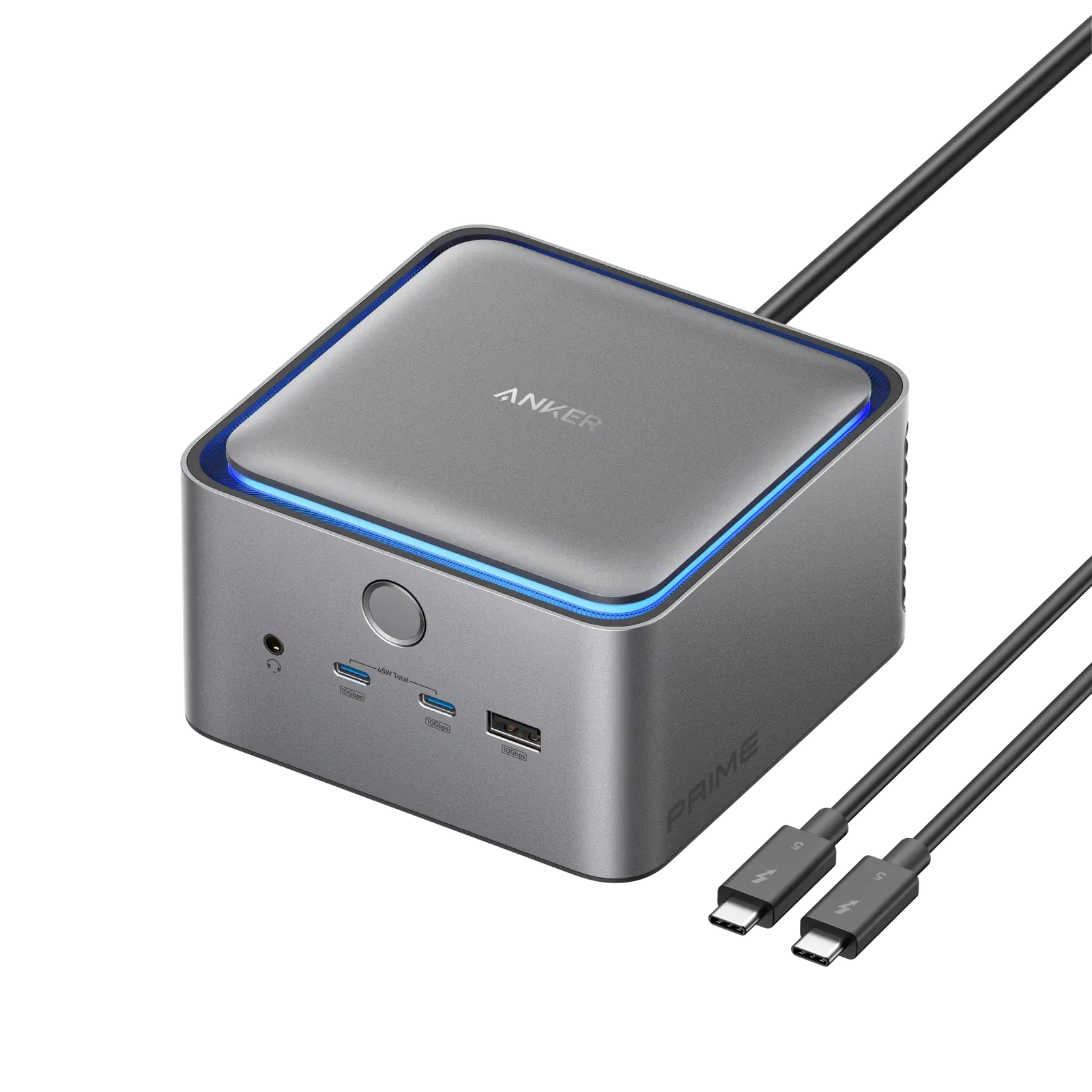
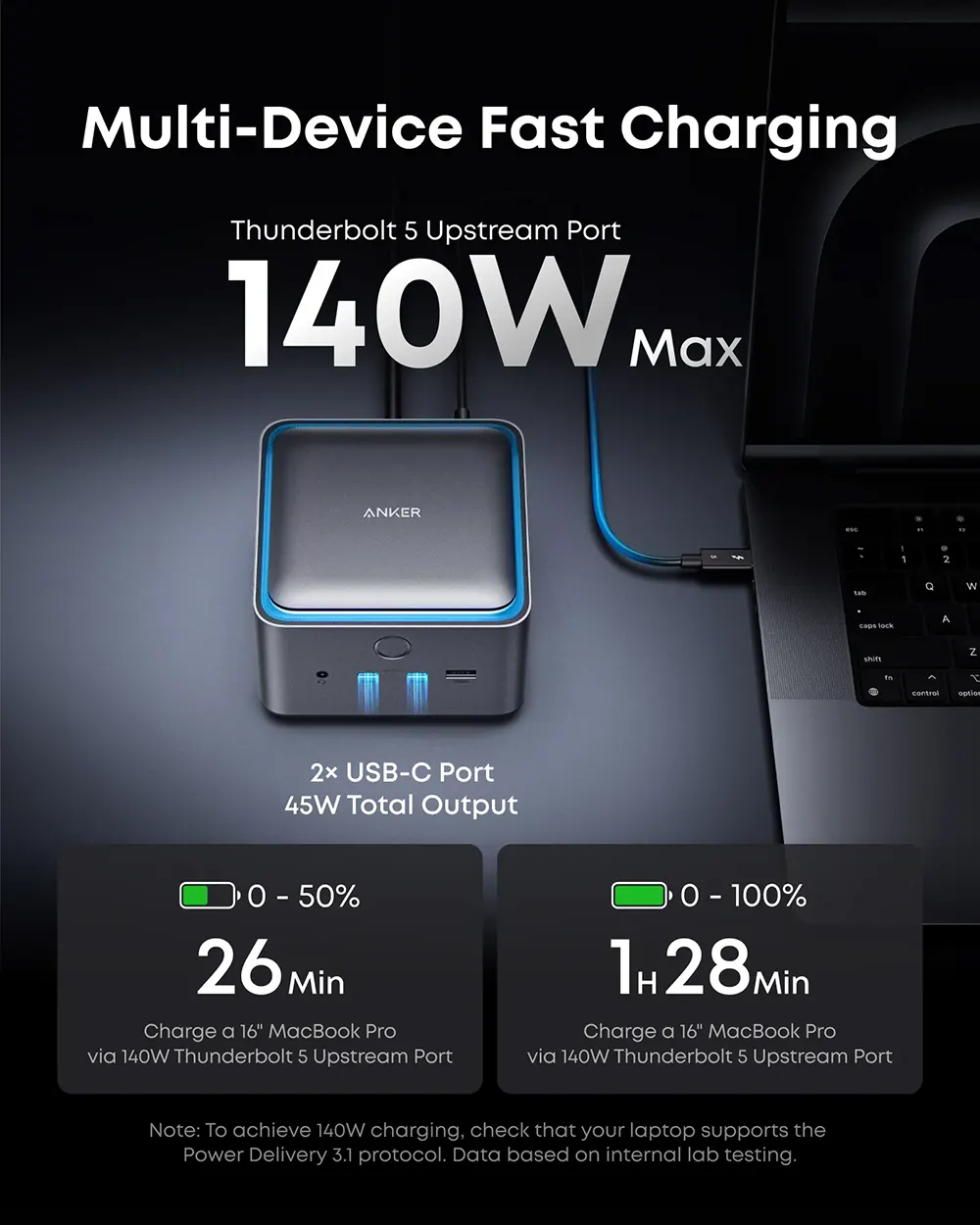
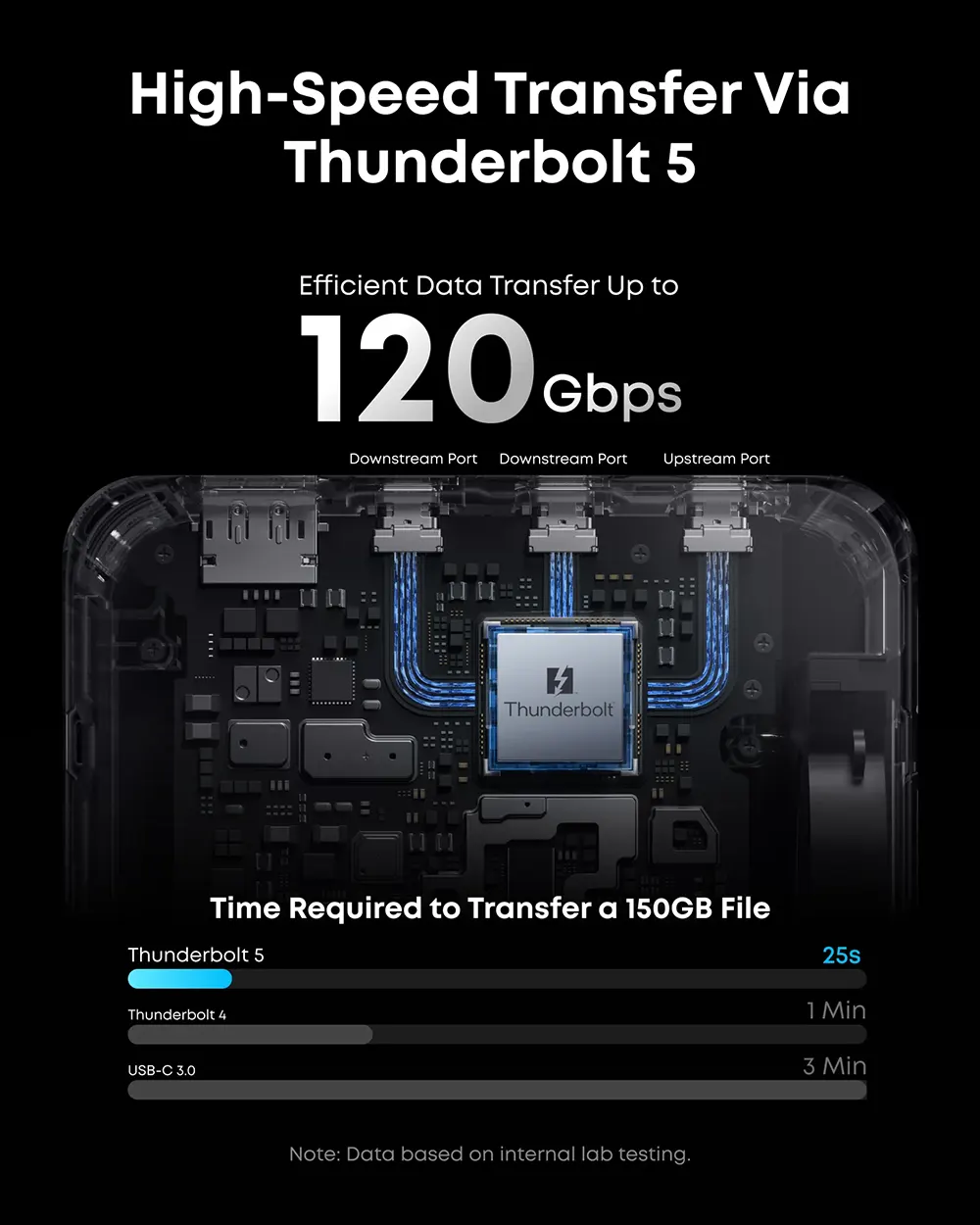
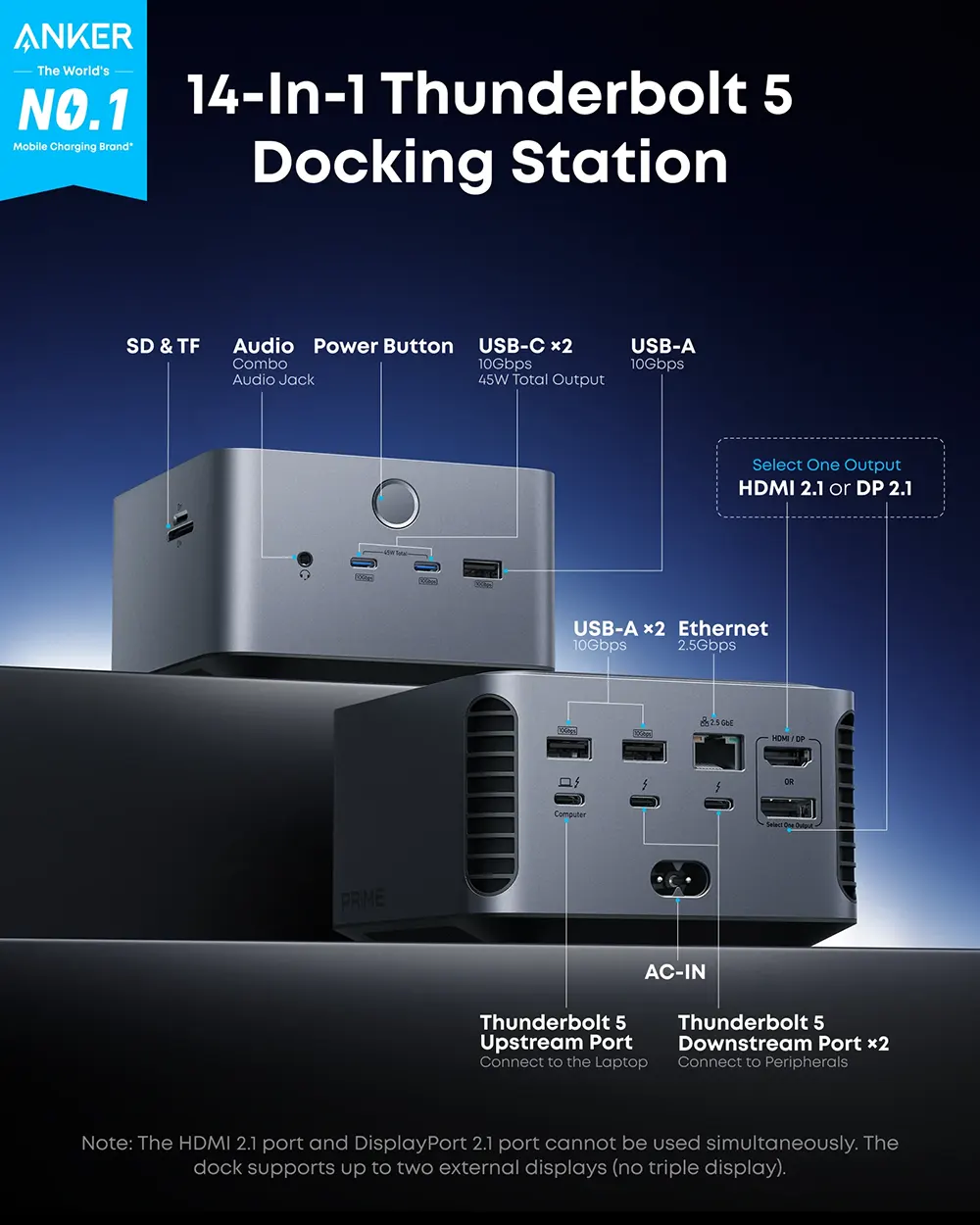
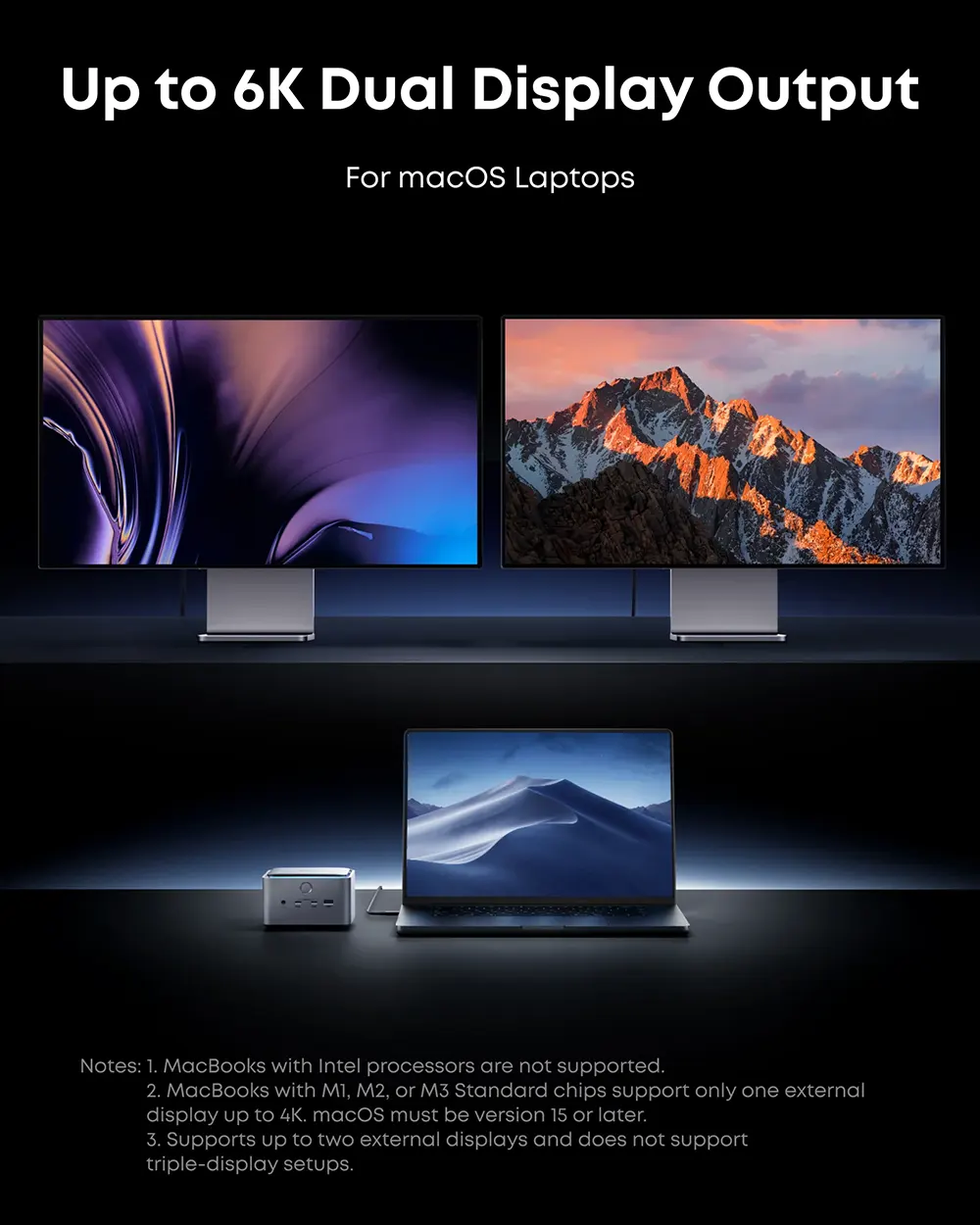
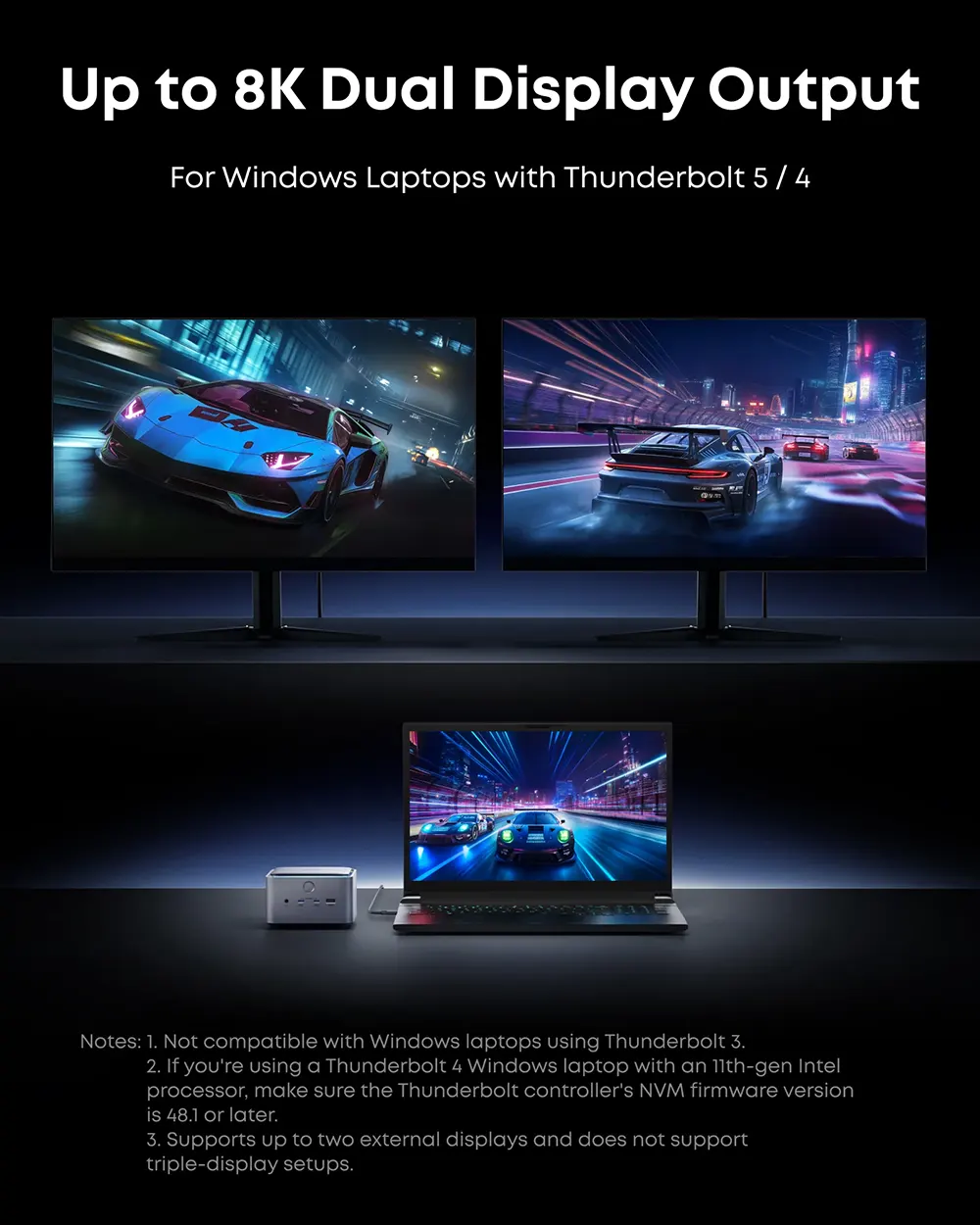
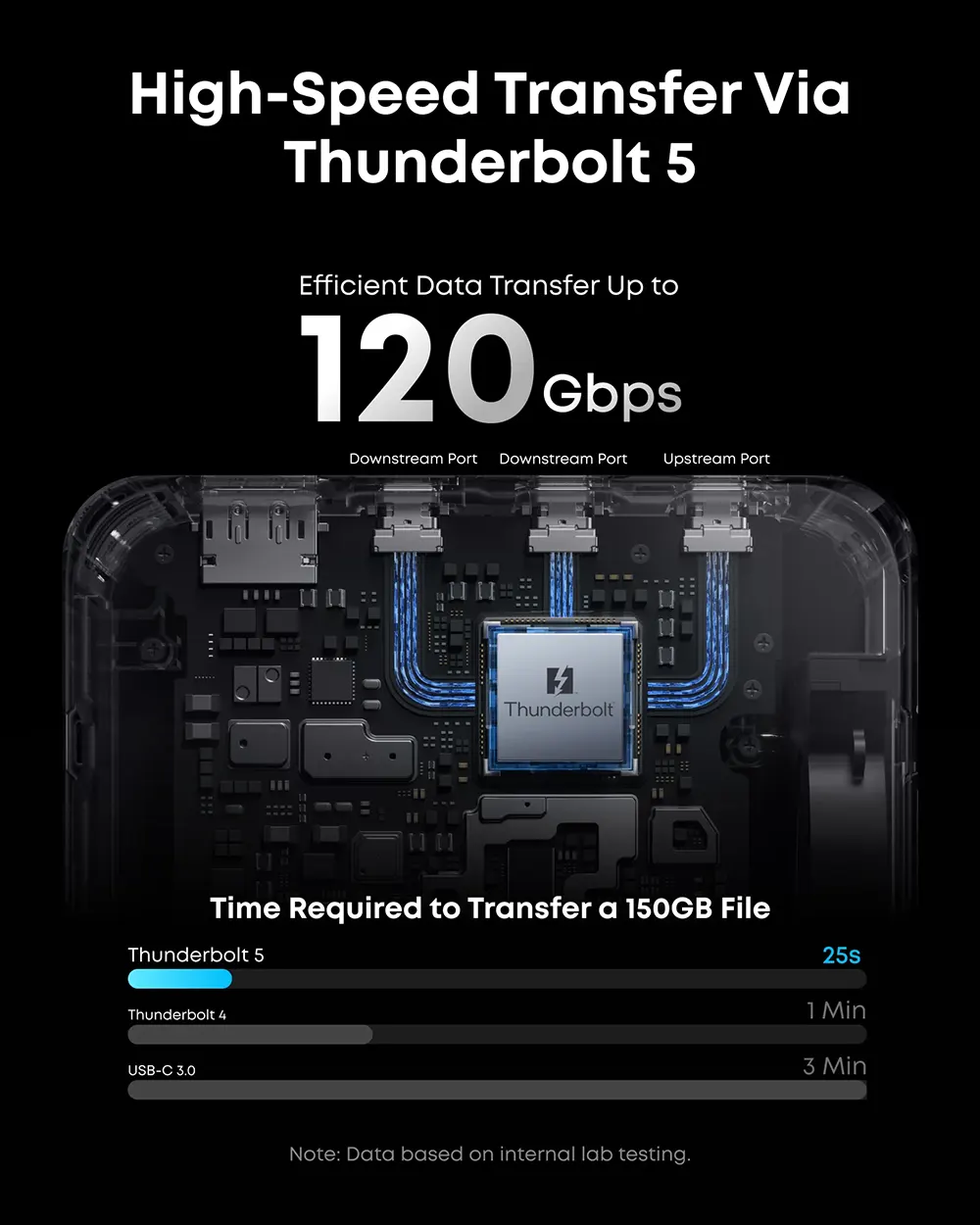
The Anker Prime Thunderbolt 5 Docking Station (14-in-1) is the definitive "Command Center" for the 2026 creative professional. While standard hubs struggle with the data demands of high-resolution video and high-speed storage, this TB5 powerhouse utilizes a massive 120Gbps Bandwidth Boost to ensure that your M4 MacBook or high-end Windows workstation never hits a performance ceiling. You’re sitting at your desk in Kathmandu, finishing a 150GB export of $8K$ RAW footage. On a standard $40Gbps$ dock, this transfer would give you enough time for a long coffee break; on the Anker Prime TB5, it’s finished in under 30 seconds. You can feel the quality of the sleek, vertical chassis—it’s designed to save desk space while the Smart Active Cooling system hums silently in the background, keeping the internal chips at optimal temperatures even when driving dual $8K$ monitors and charging your laptop at $140W$. The Interactive Ambient Lighting on the base doesn't just look premium; it provides subtle visual cues about your connection status. THE "SPEC vs. SYSTEM" BRIDGE Thunderbolt 5 Technology ➔ Older TB4 docks are limited to $40Gbps$, causing lag when multiple high-speed drives are used ➔ TB5 delivers up to 120Gbps, allowing for simultaneous 8K video editing and ultra-fast backups.140W PD 3.1 Charging ➔ Standard hubs often "drain" your battery during heavy rendering sessions ➔ This provides a full 140W of upstream power, fast-charging a 16-inch MacBook Pro to $50\%$ in just 26 minutes. 14-in-1 Total Connectivity ➔ Juggling multiple dongles for Ethernet, SD cards, and displays creates a "cable mess" ➔ This consolidates everything—including 2.5Gbps Ethernet and HDMI 2.1/DP 2.1—into a single-cable solution. No External Power Brick ➔ Traditional docks come with a "brick" larger than the dock itself ➔ Anker’s GaN technology integrates the power supply inside the unit for the cleanest desk setup possible. Vanijay Field Note The Pro Setup: In 2026, this is the only dock we recommend for M4 MacBook Pro users in Kathmandu who want to fast-charge at $140W$ without using the MagSafe cable. It’s a "one-cable" dream for desk setups. As tested the "Full Data Pipeline" by connecting two $8K$ monitors and a 10Gbps NVMe enclosure. Most docks would "stutter" the mouse cursor under this load; the Anker Prime TB5 maintained perfectly fluid $60Hz$ refresh rates across both screens while the data transfer remained at peak velocity. The Small Tech Win: The front-facing USB-C ports share $45W$ of power. This is specifically optimized to fast-charge your iPhone 17 and iPad Pro simultaneously on your desk without needing to reach for a separate wall charger. Pro-Tip: To achieve the full $120Gbps$ Bandwidth Boost, ensure you are using the included Anker Thunderbolt 5 certified cable. Standard USB-C cables—even "high speed" ones—will bottleneck this dock to $10Gbps$ or $40Gbps$ and disable the $8K$ dual-display features. Pro-Tip: If you're a photographer using the latest high-speed cards, note that the SD/TF slots are UHS-I. For maximum transfer speeds from UHS-II cards, we recommend using one of the front-facing $10Gbps$ USB-C ports with a dedicated card reader to avoid bottlenecks.
Anker Prime Thunderbolt 5 Dock | 14-in-1 8K Display | Price in Nepal
The Anker Prime Thunderbolt 5 Docking Station (14-in-1) is the definitive "Command Center" for the 2026 creative professional. While standard hubs struggle with the data demands of high-resolution video and high-speed storage, this TB5 powerhouse utilizes a massive 120Gbps Bandwidth Boost to ensure that your M4 MacBook or high-end Windows workstation never hits a performance ceiling. You’re sitting at your desk in Kathmandu, finishing a 150GB export of $8K$ RAW footage. On a standard $40Gbps$ dock, this transfer would give you enough time for a long coffee break; on the Anker Prime TB5, it’s finished in under 30 seconds. You can feel the quality of the sleek, vertical chassis—it’s designed to save desk space while the Smart Active Cooling system hums silently in the background, keeping the internal chips at optimal temperatures even when driving dual $8K$ monitors and charging your laptop at $140W$. The Interactive Ambient Lighting on the base doesn't just look premium; it provides subtle visual cues about your connection status. THE "SPEC vs. SYSTEM" BRIDGE Thunderbolt 5 Technology ➔ Older TB4 docks are limited to $40Gbps$, causing lag when multiple high-speed drives are used ➔ TB5 delivers up to 120Gbps, allowing for simultaneous 8K video editing and ultra-fast backups.140W PD 3.1 Charging ➔ Standard hubs often "drain" your battery during heavy rendering sessions ➔ This provides a full 140W of upstream power, fast-charging a 16-inch MacBook Pro to $50\%$ in just 26 minutes. 14-in-1 Total Connectivity ➔ Juggling multiple dongles for Ethernet, SD cards, and displays creates a "cable mess" ➔ This consolidates everything—including 2.5Gbps Ethernet and HDMI 2.1/DP 2.1—into a single-cable solution. No External Power Brick ➔ Traditional docks come with a "brick" larger than the dock itself ➔ Anker’s GaN technology integrates the power supply inside the unit for the cleanest desk setup possible. Vanijay Field Note The Pro Setup: In 2026, this is the only dock we recommend for M4 MacBook Pro users in Kathmandu who want to fast-charge at $140W$ without using the MagSafe cable. It’s a "one-cable" dream for desk setups. As tested the "Full Data Pipeline" by connecting two $8K$ monitors and a 10Gbps NVMe enclosure. Most docks would "stutter" the mouse cursor under this load; the Anker Prime TB5 maintained perfectly fluid $60Hz$ refresh rates across both screens while the data transfer remained at peak velocity. The Small Tech Win: The front-facing USB-C ports share $45W$ of power. This is specifically optimized to fast-charge your iPhone 17 and iPad Pro simultaneously on your desk without needing to reach for a separate wall charger. Pro-Tip: To achieve the full $120Gbps$ Bandwidth Boost, ensure you are using the included Anker Thunderbolt 5 certified cable. Standard USB-C cables—even "high speed" ones—will bottleneck this dock to $10Gbps$ or $40Gbps$ and disable the $8K$ dual-display features. Pro-Tip: If you're a photographer using the latest high-speed cards, note that the SD/TF slots are UHS-I. For maximum transfer speeds from UHS-II cards, we recommend using one of the front-facing $10Gbps$ USB-C ports with a dedicated card reader to avoid bottlenecks.
Product Details
General Information
- Brand:Anker
- Model:Prime Thunderbolt 5 Docking Station
- SKU / Model Number:A83B5
- Type:14‑in‑1 Thunderbolt 5 Docking Station
- Warranty:Hassle‑free warranty, lifetime support
- Compatibility:Windows 10/11, macOS 15 or later
- Dimensions:116 × 116 × 75 mm (4.6 × 4.6 × 3.0 in)
Technical Specifications
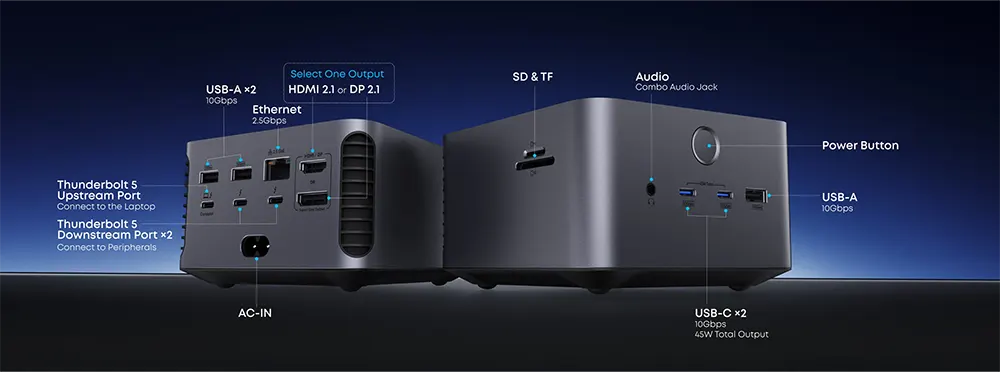
- Upstream Port:1 × Thunderbolt 5 (140W max input)
- Downstream Ports:2 × Thunderbolt 5 (15W each)
- USB‑A Ports:3 × USB‑A (10Gbps)
- USB‑C Ports:2 × USB‑C (10Gbps, 45W shared)
- HDMI / DP:1 × HDMI 2.1 OR 1 × DisplayPort 2.1 (cannot use both simultaneously)
- Ethernet:1 × 2.5Gbps RJ‑45
- Audio:1 × 3.5mm combo jack
- Card Readers:1 × SD (UHS‑I), 1 × TF (UHS‑I)
- Data Transfer:Up to 10Gbps
- Display Support:Up to 8K resolution (HDR, HDCP)
- Power Delivery:Up to 140W upstream, 45W shared USB‑C
Build & Design
- Material:Premium aluminum alloy
- Cooling System:Smart Active Cooling system
- Lighting:Interactive ambient LED lighting (dynamic effects under high load)
- Design:Compact cube form factor
- Power Supply:Integrated GaN technology (no external brick)
Inside the Box
- Docking Station Unit:Anker Prime TB5 Docking Station (14‑in‑1)
- Cable:Thunderbolt 5 certified cable (included)
- Documentation:User manual, warranty card
Safety & Compliance
- Certifications:CE/FCC compliant
- System Requirements:Windows 10/11, macOS 15+
- Limitations:Not compatible with Thunderbolt 3 laptops/monitors, ChromeOS, or Linux
- Environmental Notes:Eco‑friendly packaging, RoHS compliant
Product Highlights
Vanijay AI Assistance
AI may provide inaccurate info.
Reviews & Ratings
Sign in to rate this product
No reviews yet.
Questions & Answers
Login to ask a question
No questions yet. Be the first to ask!